



Many organizations are synchronizing their communications with Microsoft 365 or Microsoft 365 as a result of the paradigm shift from internal IT device control to cloud office apps. Then, all users of Outlook for Windows and Outlook for Mac must switch over to Microsoft 365 for their database files. The processes and techniques to directly import OLM into Office 365 are described in this article.
Microsoft doesn’t offer a dedicated program for direct data transfer since the data storage files for Outlook for Mac (OLM) and Outlook for Windows (PST) are different.
Suppose you utilize OLM Data files on a Mac and wish to save the OLM file in Office 365 or Microsoft 365 without using a Mac. In that case, you must first convert the OLM file to PST format, then import the converted PST file into the Office 365 or Microsoft 365 mailing platform. However, the user is stuck with the following issue since Microsoft’s recommended techniques do not permit importing OLM straight to PST format:
Since there is no direct converter technique, converting OLM to PST utilizing an IMAP mail account enables the transfer.
OLM to PST conversion utilizing an IMAP account
- Setting up an IMAP mail account and then transferring the emails from one platform to another are required steps in the conversion of OLM into PST. A typical platform that may be configured with a Mac and an Outlook account is Gmail with IMAP settings.
- Configure a Gmail IMAP account: Create a new Gmail account and configure it using IMAP preferences, or use an existing account and modify its preferences to IMAP.
- Integrating OLM with a Gmail account and utilizing a Gmail account makes setting up the Outlook for Mac account simple.
- Make a label in Gmail: Create a Gmail label in the Gmail account’s IMAP settings to transfer the data from the OLM file to the IMAP mailbox.
- Configure Outlook with Gmail: After the data has been moved from OLM to the Gmail label, the Gmail account must be linked to a Microsoft Outlook account.
- Transfer Gmail emails to Outlook: Transfer all emails from your Gmail account with IMAP support to Outlook, then start using the PST format of your OLM files.
- Once all the files have been imported in PST format, you may import the converted PST files into your Office 365 or Microsoft 365 account to access the account online.
- To make the switch from OLM to PST format simple, use the Gmail account as a transitional account.
An in-depth examination of importing OLM files into Office 365
- A lengthy set of commands that must be executed repeatedly on several machines frequently results in mistakes being made while carrying out the processes.
- The amount of time and work needed to import OLM files into Office 365 or Microsoft 365 utilizing the PST Capture Agent in the case of a large-scale corporate migration would be rather considerable.
- With a software-based import procedure, it is simple to prevent having to restart the entire process if a little error occurs at any stage.
Import OLM to Office 365 in 3 simple steps
- To import OLM files into Office 365 or Microsoft 365, one of the most popular choices is a software-based import technique like TrustVare Software for OLM (Technician). The software-based approach:
- Aids in the simple three-step import of OLM files into Microsoft 365. Select > Scan > Save is user-friendly and makes it possible to quickly and easily import OLM files into Office 365 or Microsoft 365.
- Displays an unrestricted glimpse of converted emails and other mailbox elements for verification
- It is compatible with the most recent version of Outlook (2016, as well as most prior versions).
- The offers ‘Smart saving Options’ to store transformed data in a variety of formats.
- It enables the ‘Find’ option for the OLM database file when the location of the file is unknown.
OLM to Microsoft 365 conversion can be aided by the actions listed below:
- Install it, then launch the TrustVare OLM Converter Tool. An option to choose the OLM file with the Select Mailbox option is available on the Home screen. When the program detects that the file location is unknown, it presents a list of files with the option Find Mailbox. Extension of OLM.
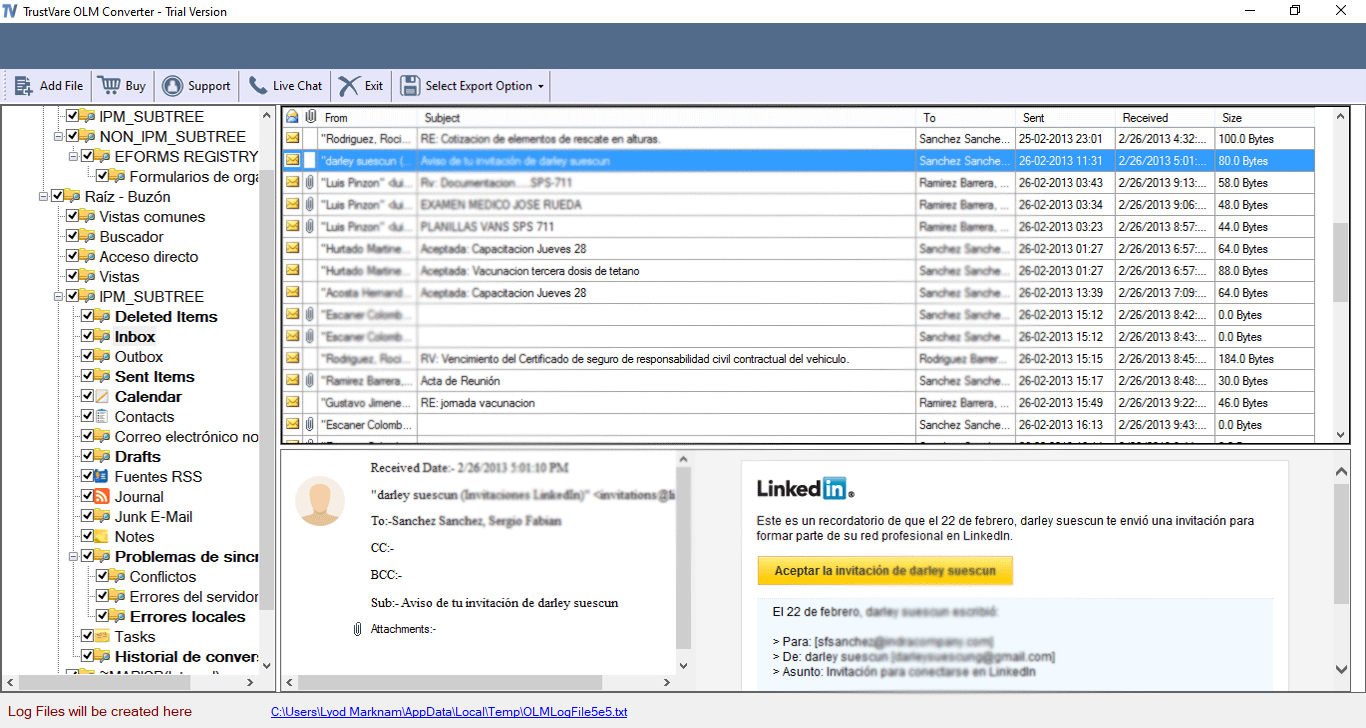

- The app begins the scanning process when you click the Convert button.
- The software begins a scanning procedure, after which it presents a glimpse of the mailbox’s contents. Check the mailbox’s contents, then click “Save.”
- The converted files are kept in a format that the user specifies, such as PST. Alternatively, using the software’s Technician edition, the files may be imported straight into Office 365. To import OLM files into Office 365, specify the login information for Cloud Office 365.
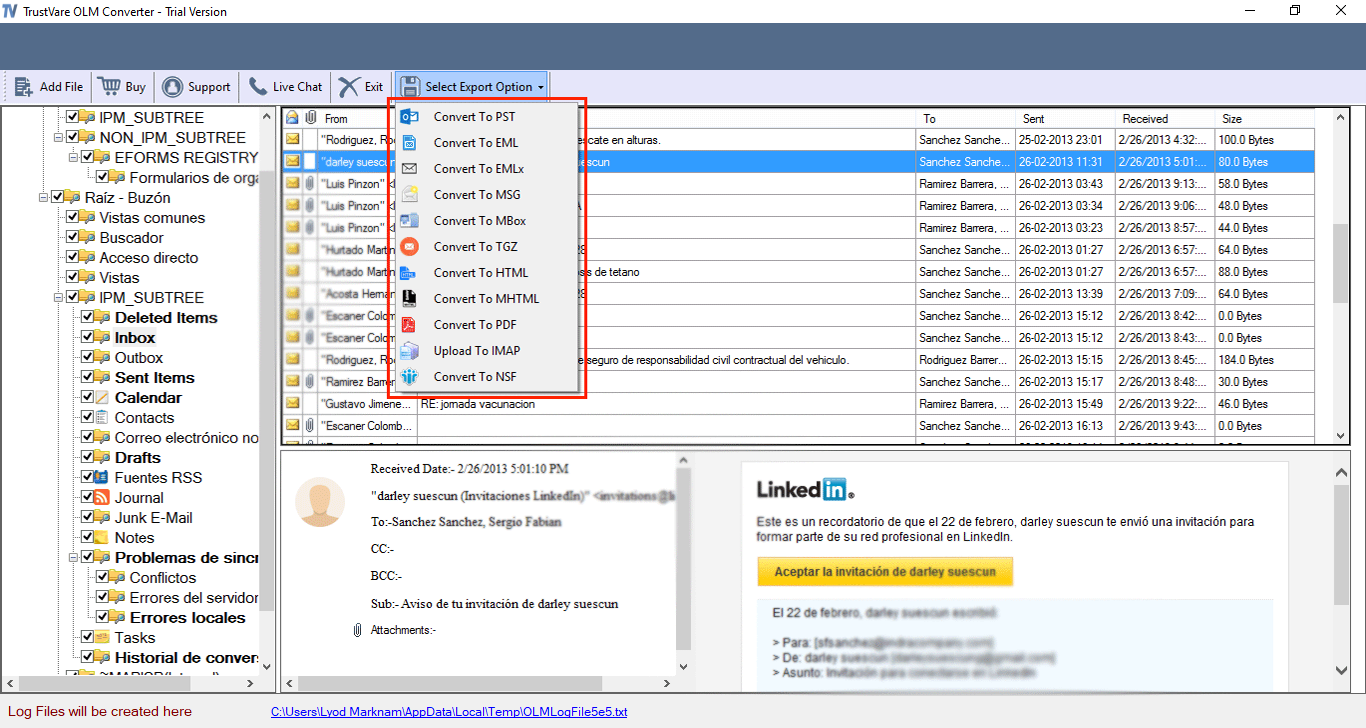
- When the procedure is finished, a pop-up stating the status of the message completion is displayed. To complete the transaction, click OK.
The Bottom Line
The Microsoft tool does not enable importing OLM files into Office 365 or Microsoft 365. In light of this, switching to Cloud Office 365 is difficult. Conversion is indeed achievable via setting up an IMAP account or the PST Capture Agent, but each of these approaches has drawbacks (scaleability, proneness to mistake, etc.). This, in contrast, makes them less effective.
Additionally, it is advised to import OLM into Office 365 or Microsoft 365 format using an advanced OLM Converter as this program directly converts and exports all mailbox data components to Office 365 or Microsoft 365 without changing the file format.